
Crawl4AI is one of the most popular open-source scraping tools in the AI ecosystem, with over 20,000 GitHub stars. It is optimized for LLM output and includes an MCP server that lets AI agents use it directly.
FireScraper is a managed scraping platform with a dashboard, API, scheduled crawls, and flat per-page pricing.
Both target AI teams. But they take fundamentally different approaches to the same problem. Here is how to decide.
The Core Tradeoff
Crawl4AI is open source and self-hosted. You run it on your own infrastructure. You get full control, zero cost for the software itself, and the ability to customize everything. The tradeoff: you manage the servers, proxies, scaling, and reliability.
FireScraper is a managed SaaS. You call an API or click a button in the dashboard. Crawls run on FireScraper's infrastructure with built-in proxy handling, queue management, and scaling. The tradeoff: you pay per page.
Feature Comparison
| Feature | FireScraper | Crawl4AI |
|---|---|---|
| Hosting | Managed (no infra to run) | Self-hosted (your servers) |
| Pricing | $0-$100 (per-page credits) | Free (but you pay for compute) |
| Dashboard UI | Full workspace with live monitoring | No — API/CLI only |
| REST API | Yes | Yes (when self-hosted) |
| TypeScript SDK | Yes (@firescraper/sdk) | No |
| Python SDK | Yes (firescraper on PyPI) | Yes (native Python) |
| MCP Server | No | Yes — AI agents can use it directly |
| Scheduled crawls | Built-in (daily, weekly, monthly) | No — build your own |
| Webhooks | Yes (HMAC-signed) | No |
| Proxy handling | Built-in (transparent) | Bring your own |
| Export formats | JSONL, Markdown, CSV, JSON, ZIP | Markdown, JSON |
| Structured extraction | JSON schema-based | LLM-based |
| Open source | No | Yes (Apache 2.0) |
Where FireScraper Wins
Zero infrastructure management. Sign up, paste a URL, get results. No Docker containers to deploy, no proxy networks to configure, no servers to scale. FireScraper handles all of that.
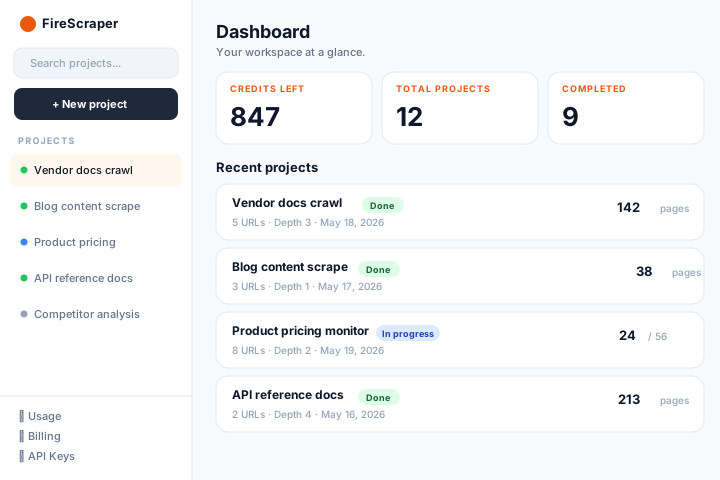
Built-in scheduling and webhooks. Set a crawl to run weekly. When it finishes, a webhook notifies your pipeline. With Crawl4AI, you would need to build this yourself — set up a cron job, handle retries, manage state.
Dashboard for monitoring. See which pages succeeded, which failed, what is in the queue. Useful for debugging crawls and understanding what your data looks like before piping it into a model.
Predictable cost. One page equals one credit. No compute-time surprises, no runaway cloud bills from a misconfigured crawl. Credits never expire.
Multiple export formats. JSONL for embedding pipelines, Markdown for LLM context, CSV for analysis, JSON for structured data, ZIP bundles for archiving. Crawl4AI primarily outputs Markdown and JSON.
Where Crawl4AI Wins
Free (as in software). If you already have compute capacity — a VPS, a Kubernetes cluster, or even a local machine — Crawl4AI costs nothing for the software itself. For teams with existing infrastructure, this is a real advantage.
MCP server for AI agents. This is Crawl4AI's most unique feature. An AI agent running Claude, GPT-4, or any MCP-compatible model can call Crawl4AI directly as a tool. No API keys, no HTTP calls — the agent just says "scrape this page" and gets structured output back.
Full customization. Because you run the code yourself, you can customize the scraping behavior, add your own post-processing, and handle edge cases that a managed API might not cover.
LLM-powered extraction. Crawl4AI uses LLMs for structured extraction, which can handle messy, inconsistent pages more flexibly than schema-based approaches. The downside: it costs LLM tokens per page.
Privacy. Your data never leaves your infrastructure. For teams with strict data handling requirements, self-hosted is the only option.
The Cost Calculation
Crawl4AI is free software, but not free to run. You need:
- A server or cloud instance (at minimum)
- Headless Chrome / Chromium for JavaScript rendering
- Proxy services for sites with anti-bot measures
- Monitoring to ensure uptime
- Your time to maintain and debug it
For a team crawling 10,000 pages per month, the math might look like:
- Crawl4AI: $20-50/month in compute + your time managing it
- FireScraper: $20 one-time for 20,000 credits (no ongoing cost if you don't crawl more)
For 100,000+ pages per month, self-hosting almost always wins on per-page cost. For smaller volumes, the managed service saves engineering time.
Which Should You Choose?
Choose FireScraper if:
- You want to start scraping in minutes, not hours
- You do not want to manage scraping infrastructure
- You need scheduled crawls and webhooks without building them
- You want a dashboard to monitor and debug crawls visually
- Your volume is under 100,000 pages per month
Choose Crawl4AI if:
- You have existing compute infrastructure you want to use
- You need an MCP server for AI agent integration
- Your data cannot leave your own servers
- You want to customize the scraping behavior deeply
- You are comfortable maintaining open-source infrastructure
Use both if:
- You use Crawl4AI for agent-driven, ad-hoc scraping (MCP server)
- You use FireScraper for scheduled production crawls with monitoring (dashboard + webhooks)
They solve the same core problem differently, and some teams genuinely benefit from both.
Try the managed approach
1,000 free crawl units. No infrastructure to set up. Dashboard, API, and scheduled crawls out of the box.