
How to Track an Online Store's Prices on a Daily Schedule
Want to watch how a store's prices move over time — track a competitor, catch a sale, or build a price-history dataset? FireScraper can crawl the store's product pages on a daily schedule and hand you a clean snapshot each day. You then diff the snapshots to see what changed.
This recipe is deliberately honest about the division of labour, because it matters:
- FireScraper does the hard parts — rendering the page (including JavaScript), targeting the product area with a CSS selector, crawling on a schedule, and giving you a downloadable export every run.
- Your code does the last mile — splitting the captured text into name/price fields and comparing one day to the next. FireScraper captures the text of the product area; it doesn't emit a per-product
pricecolumn for you.
We'll use books.toscrape.com — a demo store built for exactly this — so you can follow along without tripping over a real retailer's terms.
Before you scrape a real store: big retail sites often forbid scraping in their terms of service and sit behind bot protection that may block automated crawls. Check the site's terms and
robots.txt, and only scrape where you're permitted.
Who this is for
- Pricing and competitive-intel teams building a price-history feed.
- Developers who want a scheduled snapshot to diff in their own pipeline.
- Deal hunters watching a category for drops.
The settings at a glance
- Start URL
- A store category/listing page, e.g. https://books.toscrape.com/
- Crawl depth
- 0 for a single listing page; raise it to reach product pages
- Content CSS selector
- The product-card container (.product_pod in the demo)
- Frequency
- Daily
- Export format
- CSV (easiest to diff)
Step 1: Point a project at the store
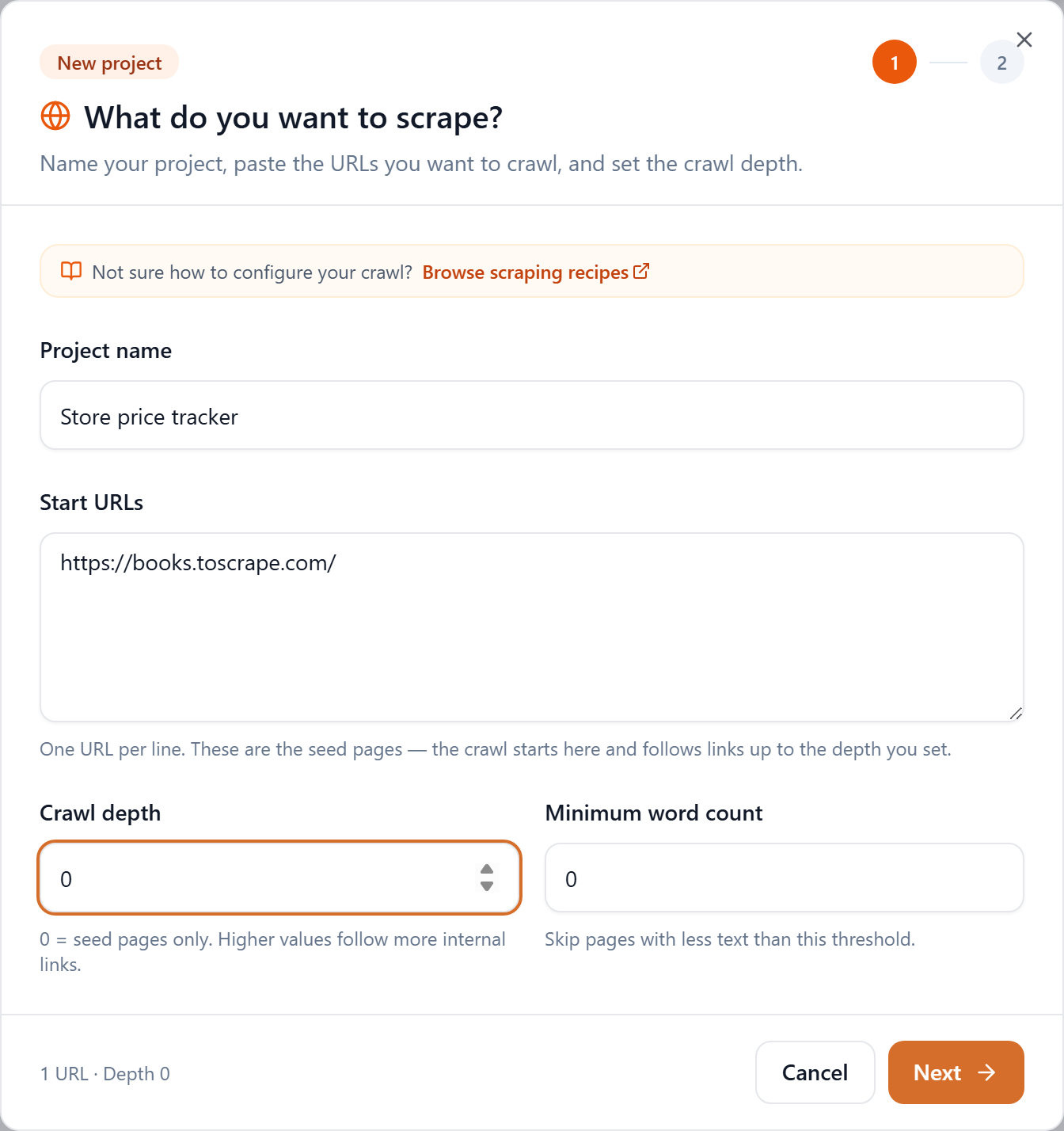
Click New project, give it a name like "Store price tracker", and paste the category or listing URL into Start URLs. For a single listing page, leave Crawl depth at 0.
Step 2: Target the products with a CSS selector
This is the key step. On step 2, set the Content CSS selector to the element that wraps each product. In the demo store every product card is a .product_pod, so that's the selector. FireScraper then keeps text only from those cards — names and prices — and discards the surrounding nav, filters, and footer.
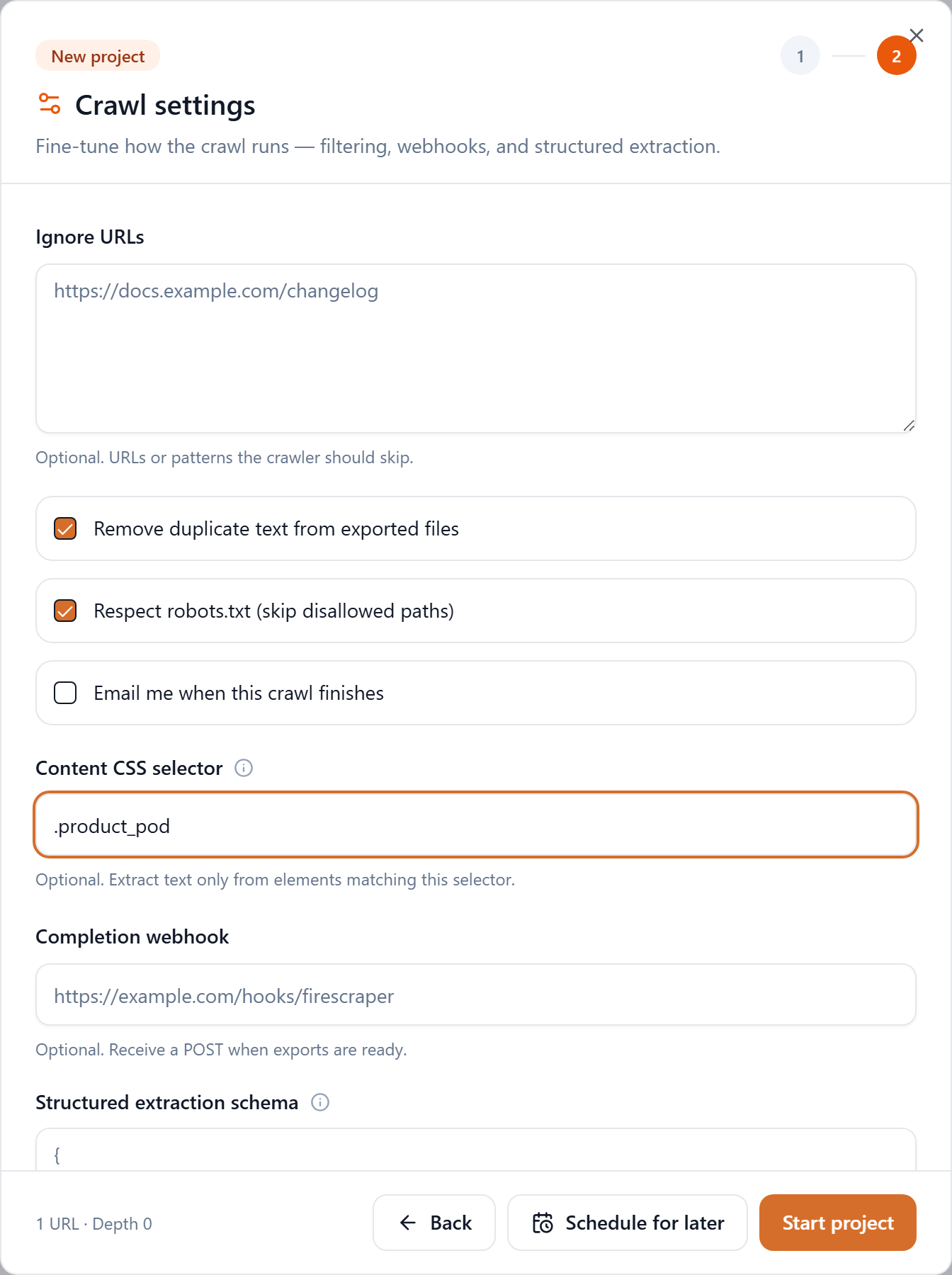
To find the right selector on any store, open the page, right-click a product tile, choose Inspect, and read the tile's wrapping class or tag. Pick the container that holds both the name and the price so they stay together. (Remember: the selector controls which region's text you capture — it doesn't map sub-elements to named fields. That's the next section.)
Step 3: Schedule it daily
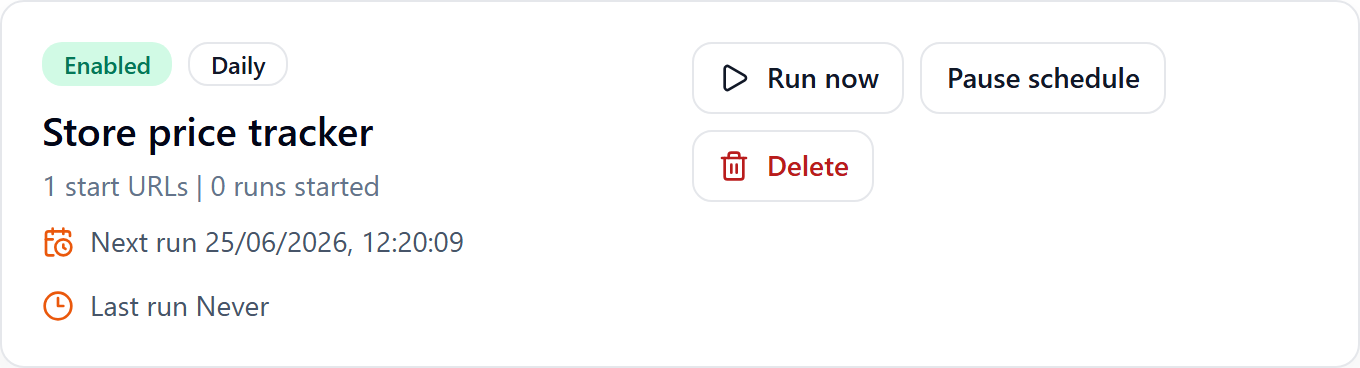
Instead of Start project, click Schedule for later, choose Daily, and click Create schedule.

Your tracker now appears on the Schedules page, where you can run it on demand, pause it, or open the latest run.
Step 4: Turn the snapshot into prices (your code)
Open any run and download the CSV. With a single listing page (depth 0) you get one row whose text holds every card's name and price, like:
A Light in the Attic £51.77 In stock
Tipping the Velvet £53.74 In stock
Soumission £50.10 In stock
...
A few lines of Python turn that into structured rows — and a price token captures both the regular and a discounted price when a store shows two:
import csv, re

PRICE = re.compile(r"[£$R€]\s?\d[\d,]*\.?\d{0,2}")

def parse_run(path):
    products = []
    with open(path) as f:
        for row in csv.DictReader(f):
            for line in row["text"].splitlines():
                prices = PRICE.findall(line)
                if prices:
                    name = PRICE.sub("", line).replace("In stock", "").strip(" -–|")
                    products.append({
                        "name": name,
                        "price": prices[-1],            # sale price is usually shown last
                        "was_price": prices[0] if len(prices) > 1 else None,
                    })
    return products
Adapt the name/price logic to how your store renders cards — stores that show a strikethrough original plus a sale price will yield two price tokens per line, which is exactly what was_price/price capture.
Step 5: Diff today against yesterday
Key each day's products by name (or by url, see below) and compare:
today = {p["name"]: p for p in parse_run("run-2026-06-23.csv")}
yesterday = {p["name"]: p for p in parse_run("run-2026-06-22.csv")}

for name, t in today.items():
    y = yesterday.get(name)
    if y and y["price"] != t["price"]:
        print(f"{name}: {y['price']} -> {t['price']}")
Run this after each scheduled crawl finishes and you've got a working price-change monitor. To trigger it automatically, add a Completion webhook on step 2 — FireScraper POSTs to it when each run's exports are ready, so your diff job can start the moment new data lands.
Upgrade: one clean row per product
For a tidier dataset, raise the crawl depth so FireScraper follows links into each product's own page. Now every product is its own crawled page — which means in the CSV export you get one row per product, with the product name already in the title column and the price in text. Join days by the stable url column instead of by name:
import csv, re
PRICE = re.compile(r"[£$R€]\s?\d[\d,]*\.?\d{0,2}")

def parse_products(path):
    out = {}
    with open(path) as f:
        for row in csv.DictReader(f):
            m = PRICE.search(row["text"])
            out[row["url"]] = {"name": row["title"], "price": m.group(0) if m else None}
    return out
This is more robust than parsing a single blob — each product has a clean name and a stable URL key.
What FireScraper can and can't do here
| Goal | How |
|---|---|
| Render a JS-heavy store page | Built in — the crawler runs a real browser |
| Capture only the product area | Content CSS selector |
| Run every day automatically | Daily schedule |
| Name & price as separate columns | Parse from the captured text in your code |
| Detect price changes over time | Diff each day's export (optionally via webhook) |
Tips
- Keep the scope tight. One category page (depth 0) is cheaper and easier to diff than a whole-site crawl.
- Store every run. Save each day's CSV with the date in the filename so you can rebuild a full price history.
- Match the cadence to the store. Daily is great for fast-moving retail; weekly is plenty for slower catalogs.
Build your own price tracker
Target the products, schedule it daily, and diff the snapshots. New accounts get 1,000 free credits.