
Web Scraping for AI Agents: Feeding Data to Autonomous Workflows
AI agents are changing how software works. Instead of humans clicking buttons and reading dashboards, autonomous agents make decisions, take actions, and iterate — all without human intervention.
But agents need data. And for many workflows, that data lives on the web: documentation sites, competitor pages, pricing tables, product catalogs, news feeds. The question is: how does an agent get clean, structured web data without a human setting up a scraping job?
The Agent Data Problem
Most scraping tools are built for humans. You open a dashboard, paste a URL, click "Start", wait for results, click "Download". That works for a one-off task. It does not work for an agent that needs to:
- Decide which sites to scrape based on a task
- Start a crawl programmatically
- Wait for results without blocking
- Process the output and use it in the next step
- Re-scrape automatically when data goes stale
This requires an API-first approach, not a dashboard-first one.
How FireScraper Fits Into Agent Architectures
FireScraper provides three primitives that make it agent-friendly:
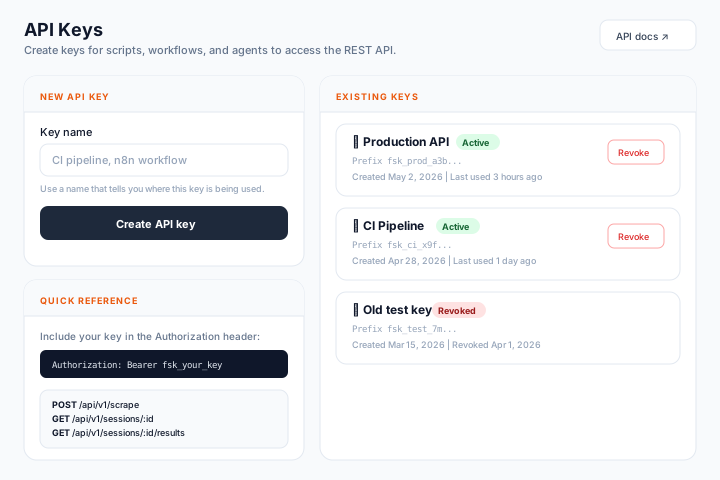
1. REST API for Programmatic Crawls
An agent can start a crawl with a single HTTP call:
const response = await fetch('https://firescraper.com/api/v1/scrape', {
  method: 'POST',
  headers: {
    'Authorization': 'Bearer fsk_your_api_key',
    'Content-Type': 'application/json',
  },
  body: JSON.stringify({
    name: 'agent-research-task',
    urls: ['https://competitor.com/pricing'],
    maxDepth: 1,
    scraper: 'article',
  }),
});

const { id: sessionId } = await response.json();
No dashboard interaction needed. The agent decides what to scrape, when, and how deep.
2. Webhooks for Async Processing
Agents should not poll. They should subscribe to events and react when data is ready:
const session = await client.scrape({
  name: 'competitor-monitor',
  urls: ['https://competitor.com/pricing', 'https://competitor.com/features'],
  maxDepth: 1,
  scraper: 'article',
  webhookUrl: 'https://your-agent.com/webhook/crawl-complete',
});
When the crawl finishes, FireScraper sends a POST to your webhook with the session ID. Your agent picks up from there — downloads results, processes them, and continues its workflow.
The webhook is HMAC-signed, so your agent can verify it came from FireScraper and was not spoofed.
3. Scheduled Crawls for Freshness
Agents that monitor competitors, track documentation changes, or maintain knowledge bases need fresh data. Instead of building a cron job, let FireScraper handle the schedule:
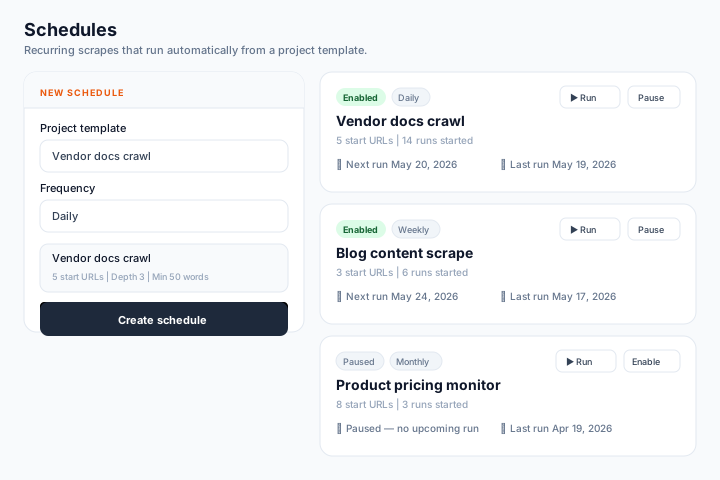
Set a crawl to run daily, weekly, or monthly. Each run triggers a webhook, which triggers your agent's processing pipeline. The agent never has to remember to re-scrape — it just reacts to fresh data as it arrives.
Example: Competitive Intelligence Agent
Here is a concrete example. You want an agent that monitors competitor pricing and alerts you when something changes.
Setup (one time):
import { FireScraper } from '@firescraper/sdk';

const client = new FireScraper({ apiKey: 'fsk_your_api_key' });

// Start a scheduled crawl for competitor pricing pages
const session = await client.scrape({
  name: 'competitor-pricing-weekly',
  urls: [
    'https://competitor-a.com/pricing',
    'https://competitor-b.com/pricing',
    'https://competitor-c.com/pricing',
  ],
  maxDepth: 0,
  scraper: 'article',
  extractionSchema: {
    type: 'object',
    properties: {
      plan_names: { type: 'array', items: { type: 'string' } },
      prices: { type: 'array', items: { type: 'string' } },
      free_tier: { type: 'string', description: 'Description of the free tier, if any' },
    },
  },
  webhookUrl: 'https://your-agent.com/webhook/pricing-update',
});
Agent webhook handler:
app.post('/webhook/pricing-update', async (req, res) => {
  const { sessionId } = req.body;

  // Download structured results
  const download = await client.getResults(sessionId, 'json');
  const currentPricing = JSON.parse(Buffer.from(download.data).toString());

  // Compare with last known pricing (from your DB)
  const changes = detectPricingChanges(currentPricing, previousPricing);

  if (changes.length > 0) {
    // Alert via Slack, email, or trigger another agent
    await sendAlert(`Pricing changes detected: ${changes.join(', ')}`);
  }

  // Store current pricing for next comparison
  await savePricing(currentPricing);

  res.sendStatus(200);
});
The agent runs entirely on autopilot. Every week, FireScraper crawls the competitor pages, extracts structured pricing data, and pings the webhook. The agent compares, detects changes, and alerts you.
Export Formats for Agent Consumption
Different agent architectures need different formats:
| Format | Best For |
|---|---|
| JSONL | Streaming into embedding pipelines — one record per line |
| Markdown | Passing to LLMs as context — clean, token-efficient |
| JSON | Structured data for programmatic processing |
| CSV | Loading into databases or spreadsheets |
The Markdown export is particularly useful for LLM-based agents. It strips all HTML and gives you clean text that uses fewer tokens than raw HTML.
Building Blocks for Any Agent Framework
Whether you are using LangChain, CrewAI, AutoGen, or a custom agent framework, the pattern is the same:
- Tool definition: Wrap the FireScraper API as a tool the agent can call
- Data retrieval: Agent decides what URLs to scrape, starts a crawl
- Async processing: Webhook notifies when data is ready
- Consumption: Agent downloads results in the format it needs
- Freshness: Scheduled crawls keep the data pipeline running
FireScraper becomes the eyes of your agent — the component that turns the open web into structured data the agent can reason about.
Give your agents web access
REST API, TypeScript SDK, webhooks, and scheduled crawls. 1,000 free crawl units.