
How to Automate Your Pipeline with the Completion Webhook
Polling "is it done yet?" is no way to build a pipeline. When you're wiring FireScraper into a real app — a daily price tracker, a RAG ingestion job, a content sync — you want to be told the moment fresh data is ready, and then react. That's what the completion webhook is for: FireScraper sends a signed POST to your endpoint as soon as a crawl's exports are generated.
This recipe shows how to set it up, what the payload looks like, and how to verify it's genuinely from FireScraper.
Who this is for
- Developers building automated pipelines — embeddings, diffs, database loads.
- Anyone using scheduled crawls who wants each run to trigger downstream work.
- Teams that need a reliable "data is ready" signal instead of polling.
Step 1: Add a completion webhook
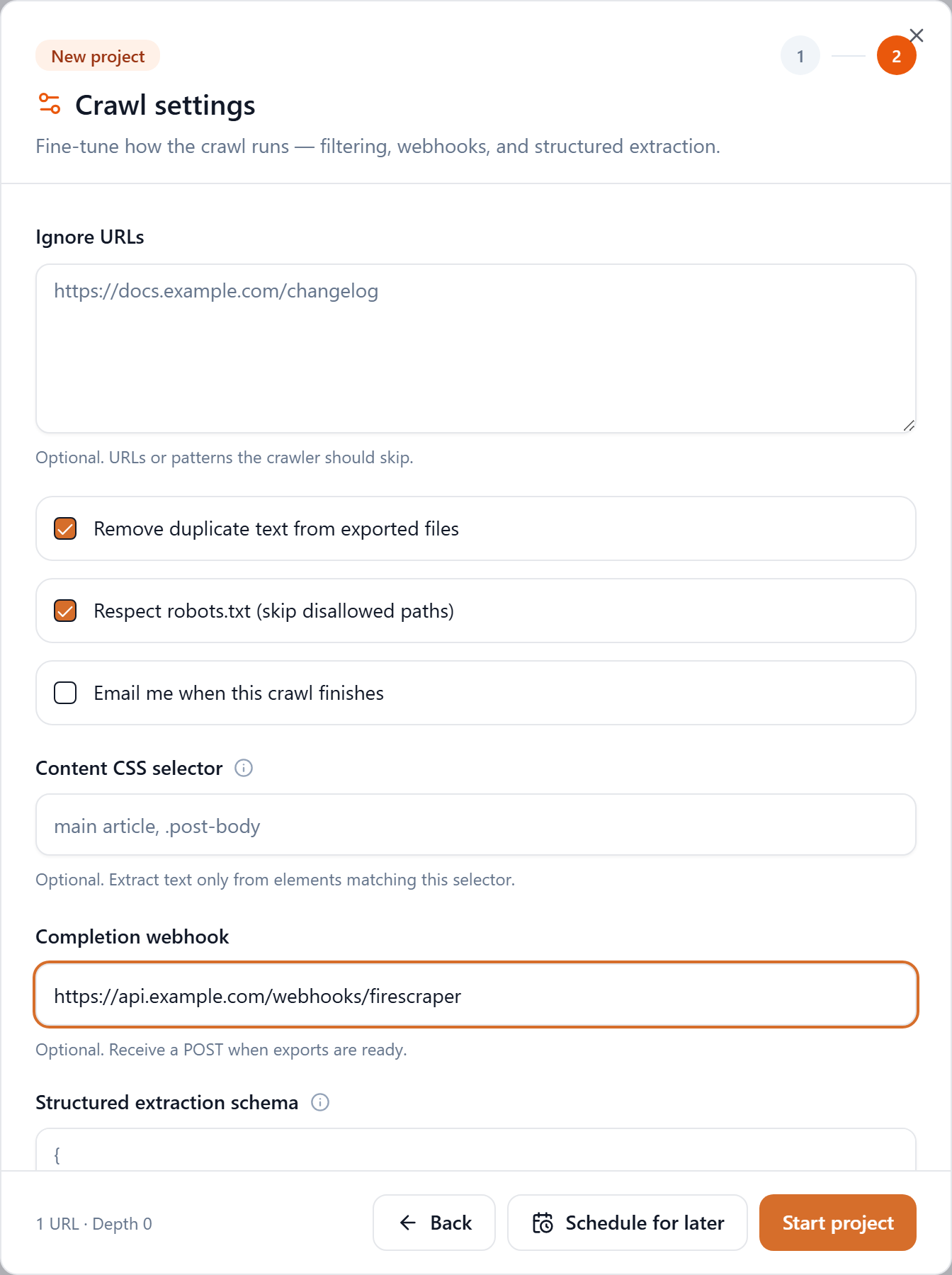
On step 2 of a project, paste your endpoint into Completion webhook. FireScraper will POST to it every time that project's exports finish — including every scheduled run.
To verify signatures, create the project via the API. When you start a project through
POST /api/v1/scrapewith awebhookUrl, the response includes awebhookSecret(whsec_…, shown once) — the key you'll use to verify deliveries. See the API docs for the request shape.
Step 2: Receive the POST
When the run finishes, FireScraper sends a JSON body like this:
{
  "event": "session.completed",
  "occurredAt": "2026-06-22T09:14:03.000Z",
  "userId": "…",
  "sessionId": "…",
  "session": {
    "id": "…",
    "name": "Store price tracker",
    "status": "done",
    "duration": 41200,
    "scraper": "article",
    "maxDepth": 0,
    "minTextLength": 0,
    "startUrls": ["https://example.com/products"],
    "ignoreUrls": []
  },
  "summary": {
    "success_count": 20,
    "document_count": 20,
    "chunk_count": 58,
    "total_words": 8123,
    "domains": { "example.com": 20 }
  },
  "files": ["corpus-csv.csv", "corpus-documents.jsonl", "corpus-chunks.jsonl", "..."]
}
The fields you'll act on most:
| Field | What it tells you |
|---|---|
| event | Always "session.completed" for now |
| sessionId | Which run finished — use it to fetch results |
| session | The config that ran (name, depth, start URLs…) |
| summary | Counts for this run (pages, documents, chunks, words) |
| files | The export files now available to download |
Each delivery also carries headers:
content-type: application/json
user-agent: FireScraper-Webhooks/1.0
x-firescraper-signature: t=1750581243,v1=9f86d081...<hex>
Step 3: Verify the signature
The x-firescraper-signature header is t=<unix-timestamp>,v1=<hmac>, where the HMAC is HMAC-SHA256 of "{timestamp}.{raw_body}" using your webhookSecret. Verify it against the raw request body (not a re-serialized object):
const crypto = require("crypto");
const express = require("express");

const app = express();
const SECRET = process.env.FIRESCRAPER_WEBHOOK_SECRET; // whsec_...

// Use the raw body so the signature matches byte-for-byte
app.post("/webhooks/firescraper", express.raw({ type: "application/json" }), (req, res) => {
  const header = req.get("x-firescraper-signature") || "";
  const parts = Object.fromEntries(header.split(",").map((p) => p.split("=")));
  const signed = `${parts.t}.${req.body.toString("utf8")}`;
  const expected = crypto.createHmac("sha256", SECRET).update(signed).digest("hex");

  const ok =
    parts.v1 &&
    parts.v1.length === expected.length &&
    crypto.timingSafeEqual(Buffer.from(parts.v1), Buffer.from(expected));

  if (!ok) return res.status(400).send("bad signature");

  res.sendStatus(200); // acknowledge fast, then work asynchronously

  const event = JSON.parse(req.body.toString("utf8"));
  enqueueProcessing(event); // e.g. embed, diff prices, load a database
});
Step 4: React
Once verified, kick off whatever your pipeline does next — using event.sessionId to pull the run's exports and event.summary to sanity-check it. This is the piece that turns a scheduled crawl into a hands-off system: every run lands, your endpoint fires, your job runs.
Delivery behaviour & best practices
- Respond fast. FireScraper waits up to 10 seconds for a
2xx. Acknowledge immediately and do the heavy work asynchronously. - It retries. Failed deliveries are retried up to 3 times with backoff (≈1s, 4s, 16s). Make your handler idempotent — the same
sessionIdmay arrive more than once. - Always verify. Check the signature before trusting a payload, and reject anything that doesn't match.
- Use HTTPS for your endpoint.
Build an event-driven scraping pipeline
Get a signed POST the moment your data is ready. New accounts get 1,000 free credits.